Complete Guide to the Best Instacart Bot Grabber for Android
What Is a "Batch Grab Bot"?
A "batch grabber bot" — also known as an Instacart bot or Instacart batch grabber — is an automation tool designed to help Instacart shoppers react faster to available batches. It continuously monitors the batch feed and performs actions — such as refreshing and accepting — based on predefined rules you set. This allows shoppers to spend less time tapping their screens and more time completing profitable orders.
Batch Grab is the safest Instacart bot for Android. It operates as a client-side Android overlay that runs directly on your device, on top of the Instacart app. Unlike other Instacart batch grabbers that rely on remote servers or require your login credentials, Batch Grab processes everything locally — which helps maintain a more natural usage pattern while improving speed, consistency, and efficiency.
How Batch Grab Works?
Batch Grab is designed to help you get more Instacart batches automatically. Here's what it does:
- Monitors your Instacart batch screen in real time
- Compares available batches against your custom filters
- Automatically accepts matching batches at high speed
- Optionally refreshes the batch feed to surface new Instacart batches faster
- Optionally spoofs GPS or store location so you appear closer to selected stores
Whether you're in a highly competitive market or simply want to stop refreshing your screen all day, Batch Grab gives you the edge you need.
Core Features of Batch Grab
Auto-Accept (The "Grab") — Available on All Plans
The core function of any Instacart batch grabber is auto-accept. When a batch meets your predefined criteria, Batch Grab automatically accepts it on your behalf. This eliminates the delay caused by manually reviewing and tapping on batches.
Best use case: Highly competitive markets where desirable Instacart batches disappear almost instantly.
Smart Filters (Precision Control) — Available on All Plans
The effectiveness of any Instacart bot depends heavily on how well your filters are configured. Auto-Accept should only be enabled for batches you actually want to complete.
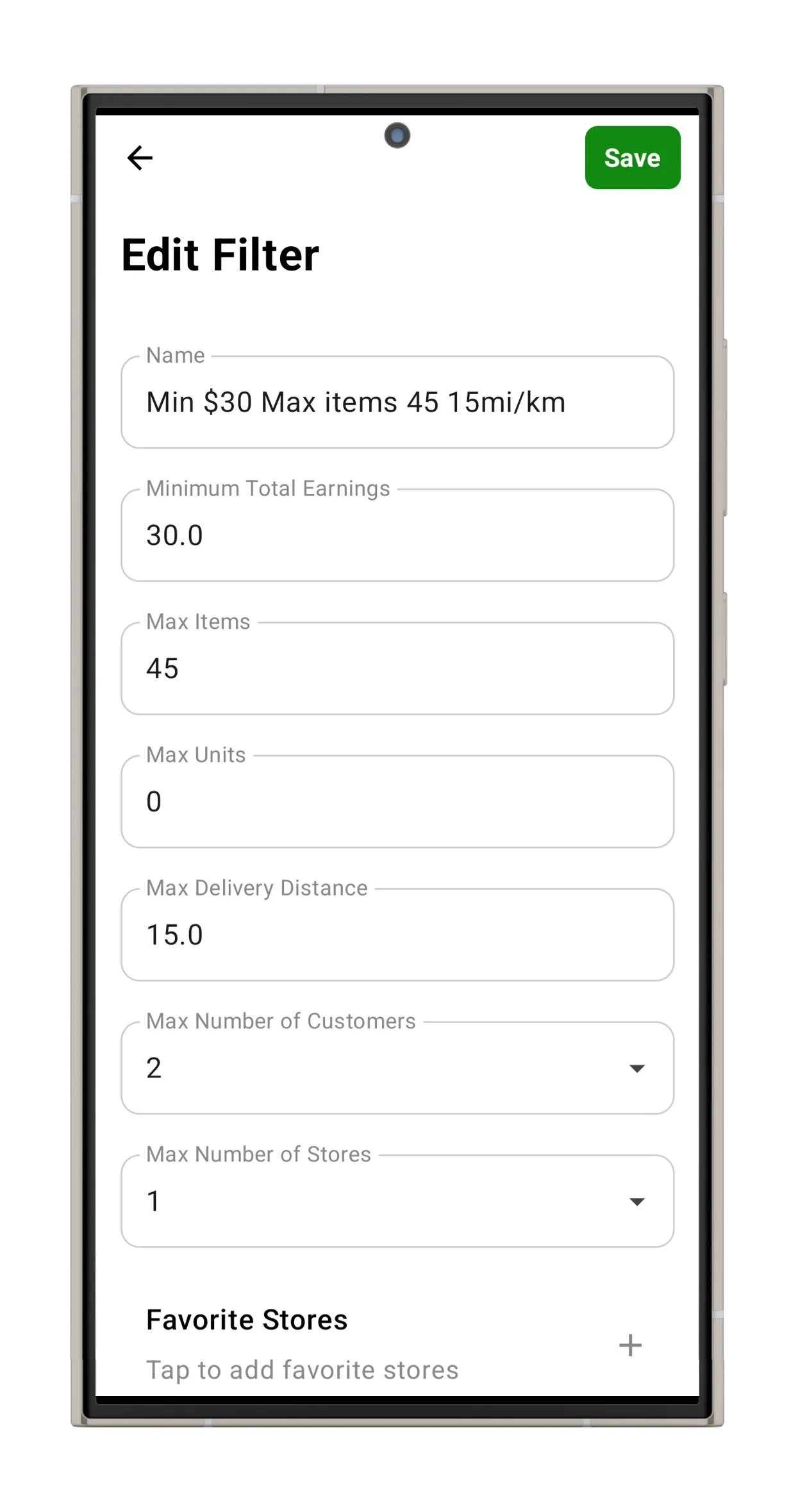
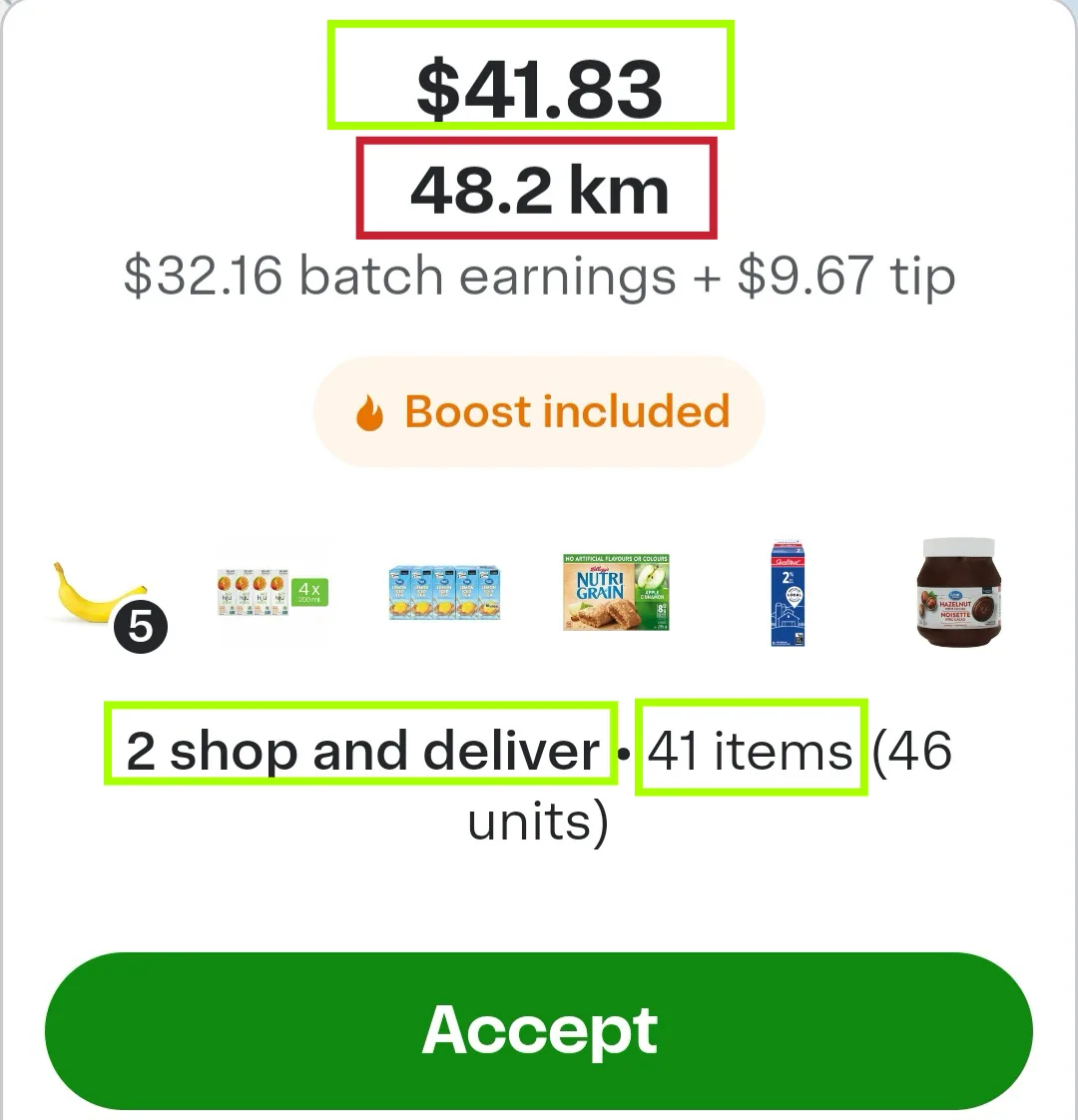
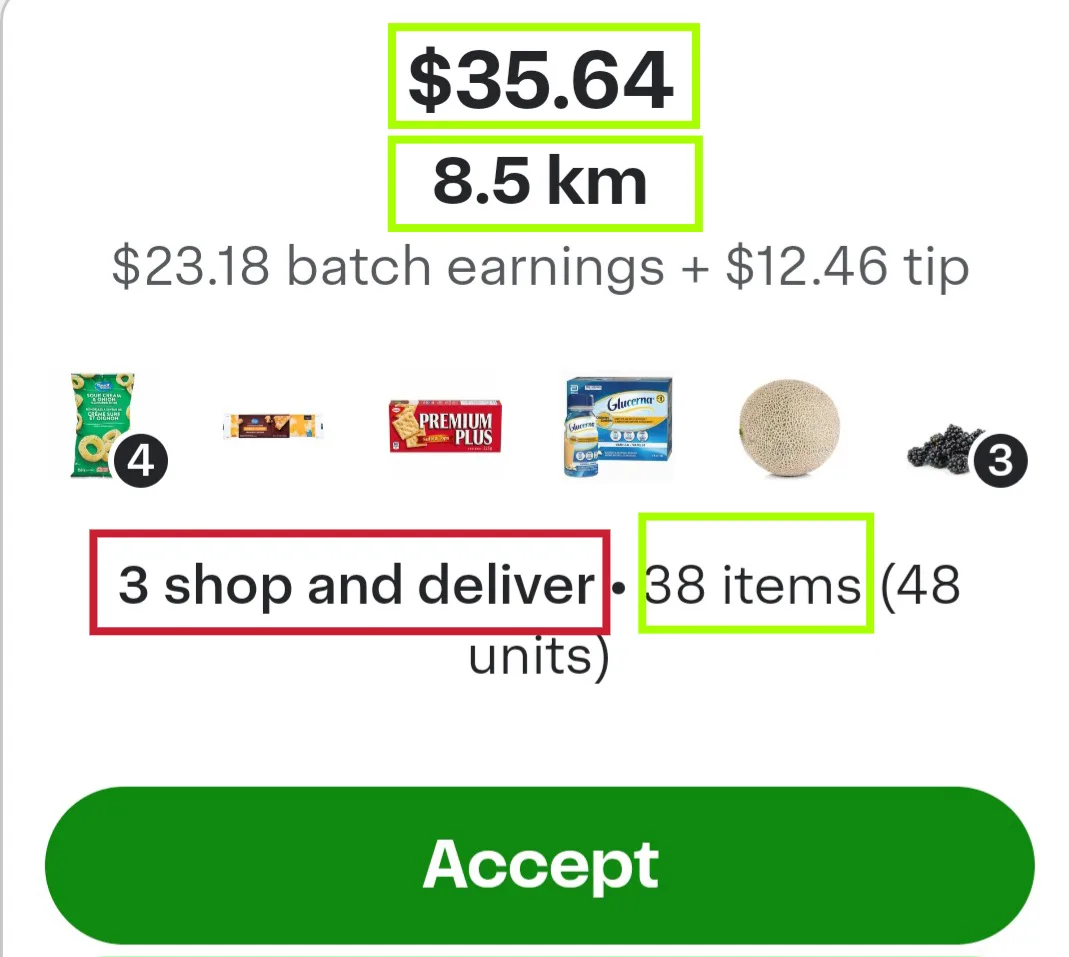
Batch Grab offers seven filter criteria to give you precise control:
| Criteria | Description |
|---|---|
| Minimum Total Earnings | Includes both batch earnings and customer tips |
| Max Items | Maximum number of items per order |
| Max Units | Maximum total units per order |
| Max Distance | Maximum driving distance from store to drop-off |
| Max Customers | Maximum number of customers per batch |
| Max Stores | Maximum number of stores per batch |
| Favorite Stores Only | Restricts acceptance to your saved Favorite Stores |
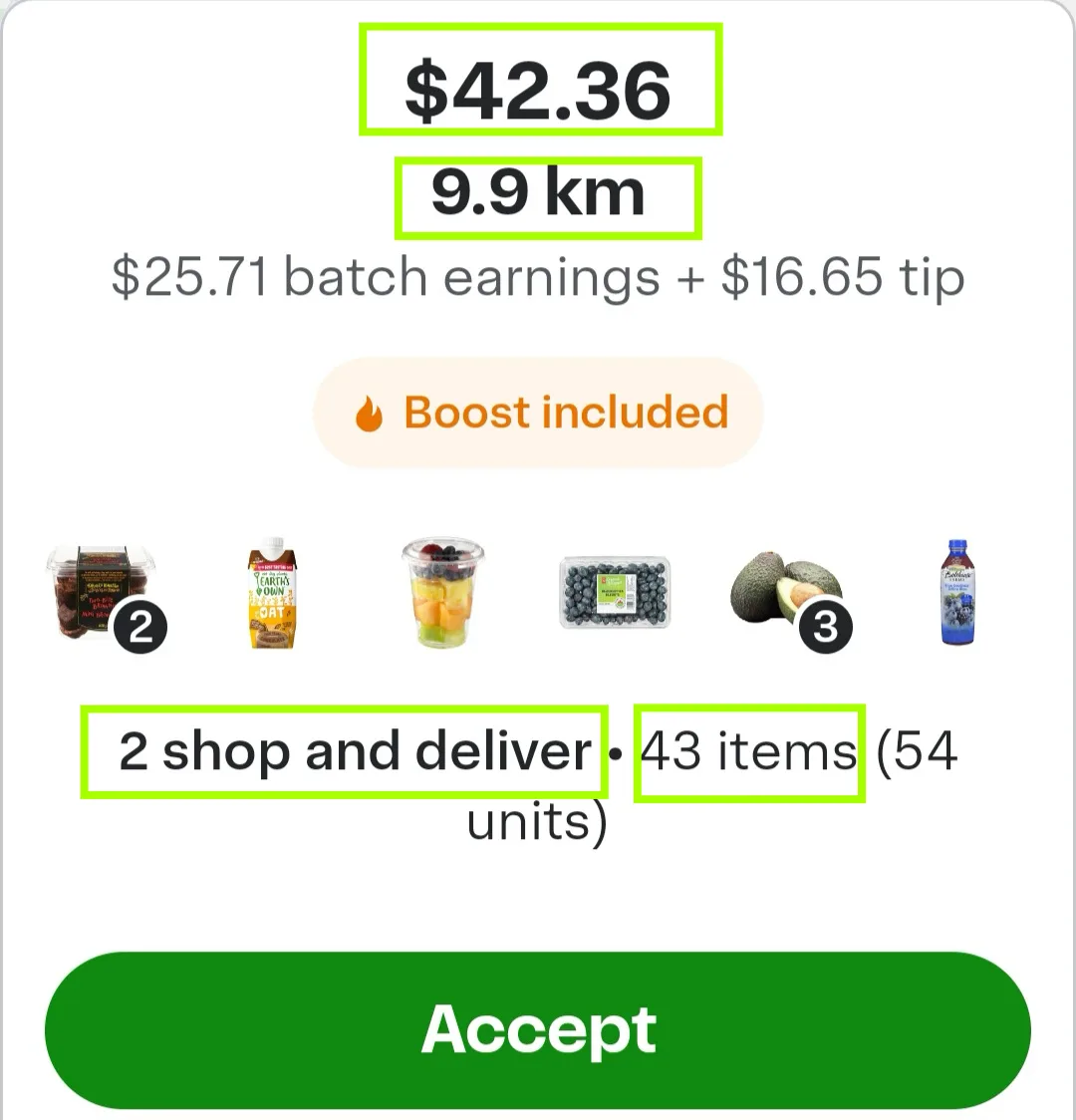
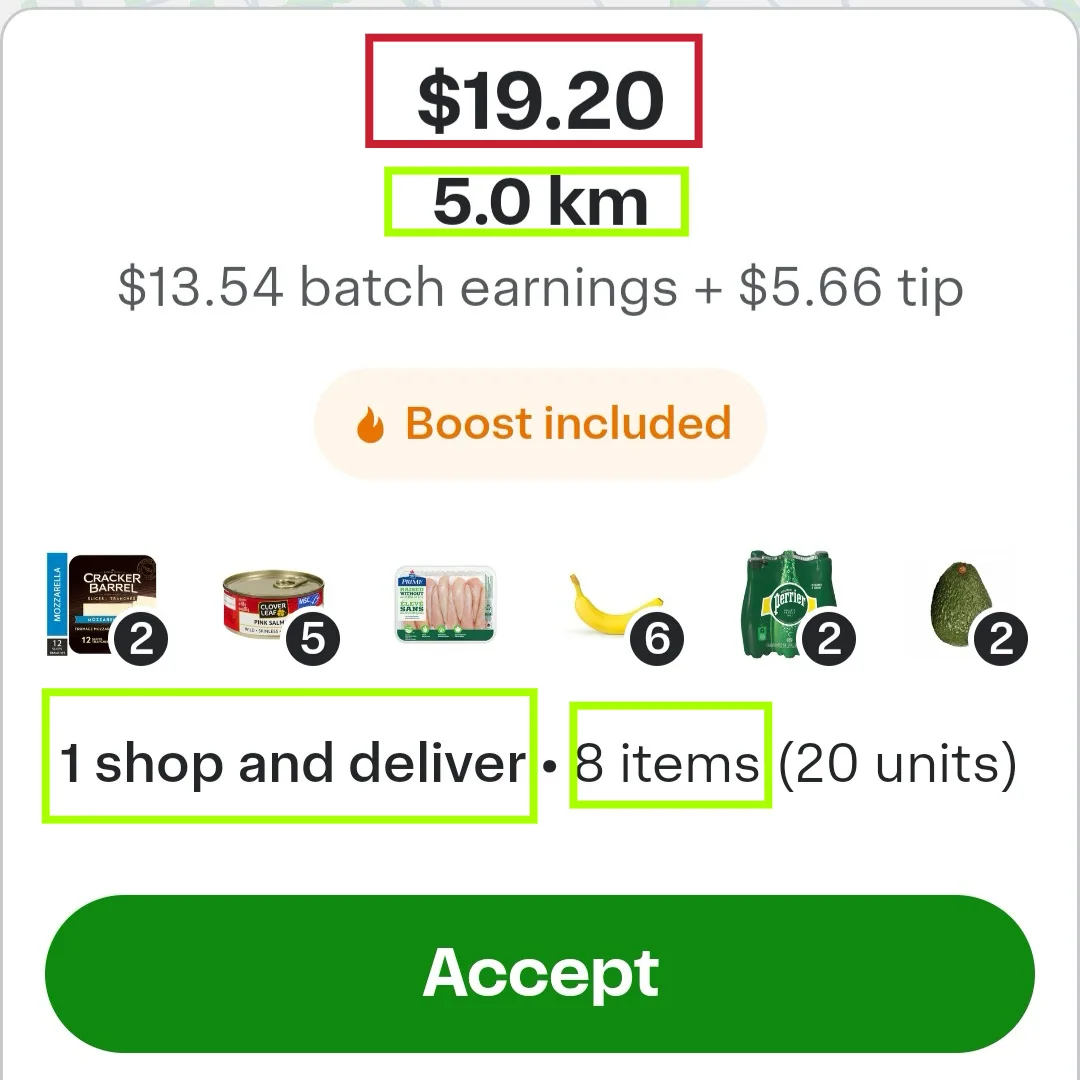
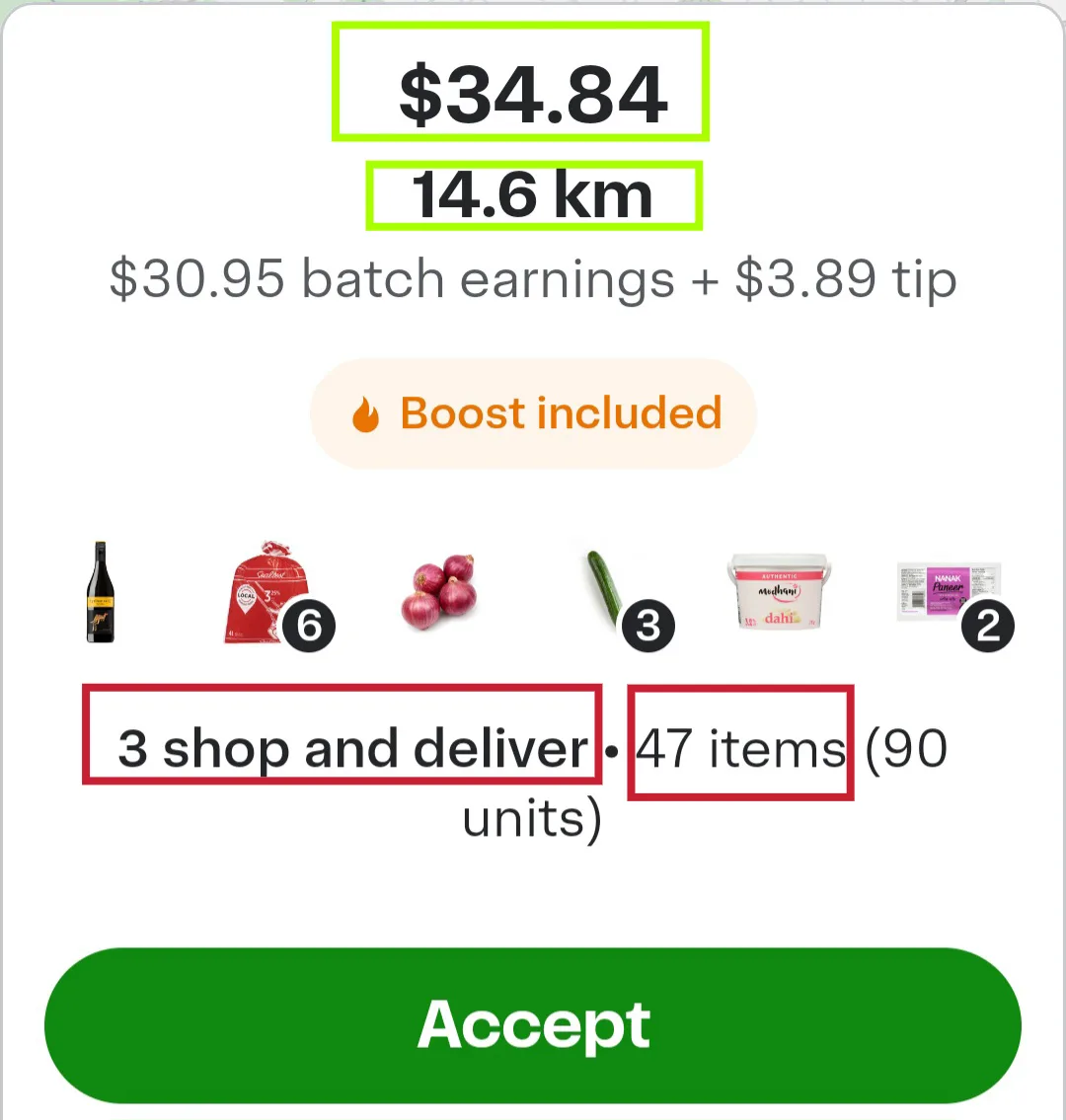
Important: A batch must meet all active filter criteria to be accepted.
Tip: To turn a filter on/off or delete it, swipe left.
Pro Tip: Want to see why a batch didn't match your filters? Go to Batch History, tap on the batch, and it will show exactly which criteria the batch missed.
Sampled Filter with Sampled Batches
Smart Auto-Refresh (The "Speed Engine") — Available on Paid Plans
While manual refresh remains available, Batch Grab offers Smart Auto-Refresh to reduce the need for constant screen interaction.
Why it matters: If your Instacart batch feed refreshes more slowly than other shoppers' feeds, you may miss high-quality batches. Auto-Refresh allows you to stay competitive without continuously watching your screen — a key advantage over using the Instacart app manually.
Watch a quick demo of Batch Grab running as an overlay on the Instacart Shopper app, refreshing the batch feed automatically in the background.
This is what separates Batch Grab from manually refreshing — while other shoppers are tapping their screens, your app is already scanning for the next high-paying batch.
Favorite Stores (Target the Stores You Want) — Available on Paid Plans
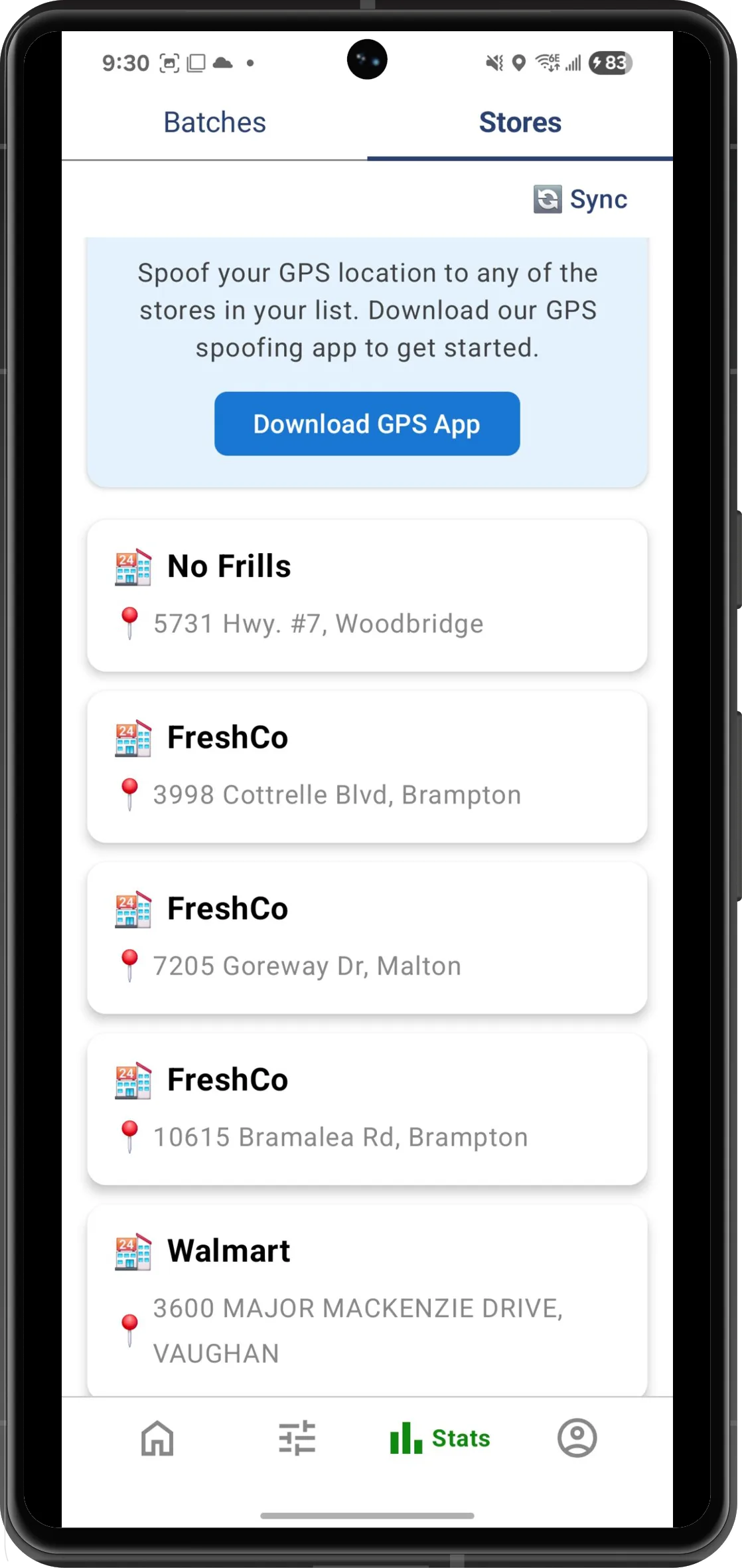
As Batch Grab scans available Instacart batches, it automatically saves detected stores to your Favorite Stores list. You can then prioritize these stores in two ways:
- Filter batches so that only those from selected favorite stores are accepted
- Combine favorite stores with GPS spoofing to gain a proximity advantage
GPS / Store Location Spoofing (Work "Closer" to Demand) — Available on Paid Plans
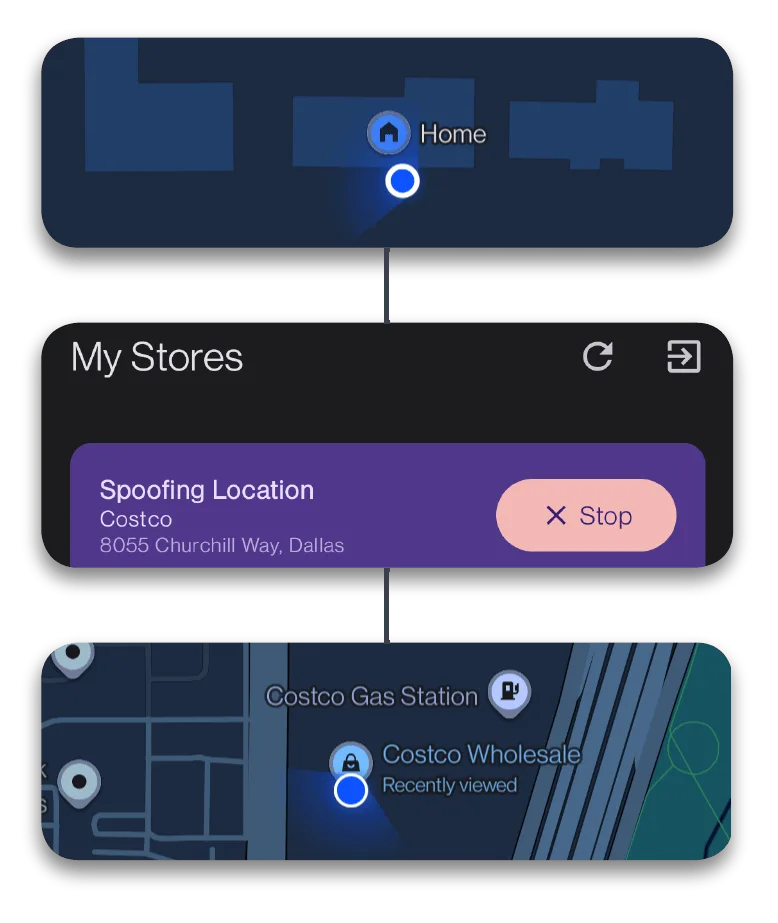
One of the most powerful features of this Android Instacart bot is GPS spoofing. Batch Grab includes the ability to spoof your location to any detected store from your batch feed. The app builds a store list dynamically based on observed batch data.
Why this matters for Instacart shoppers: Instacart uses a proximity-based prioritization model — often summarized as "closer shoppers see better batches." GPS spoofing lets you appear closer to high-demand stores without physically being there.
Batch History Tracking (Performance Feedback Loop) — Available on Paid Plans
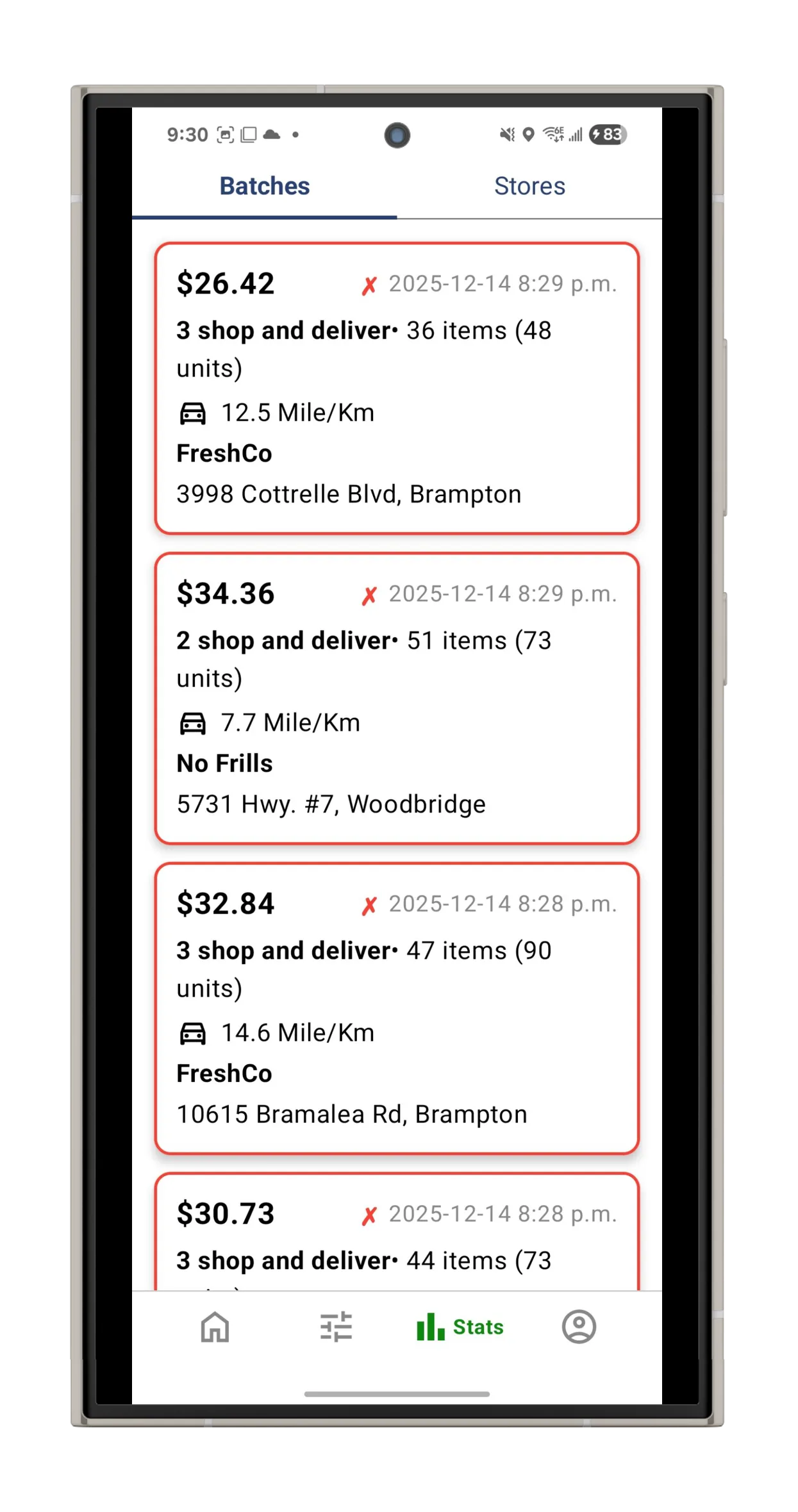
Batch History Tracking records every Instacart batch you accept over time.
Why it matters: Reviewing batch history allows you to refine your filters — for example, adjusting minimum earnings, item limits, or distance thresholds — based on real acceptance data. This is how top Instacart shoppers optimize their earnings week over week.
Overlay and Background Operation — Available on All Plans
Batch Grab runs quietly in the background and appears as a floating overlay widget when Instacart is open. This allows the app to monitor Instacart batches without disrupting your workflow.
Safety-focused design: The app emphasizes client-side processing and does not require shared logins, VPN usage, or server-side access — features that could otherwise increase the risk of Instacart account restrictions.
Human Support and Telegram Community
Unlike many Instacart batch grabber apps that offer no support, Batch Grab provides real-time human support and maintains an active Telegram community. Users can receive assistance, updates, and guidance directly from the team.
Plans and Pricing
Batch Grab offers three plans with flexible payment options (daily/weekly/monthly):
| Free | Basic | Pro |
|---|---|---|
| Up to 2 Filters | Up to 10 Filters | Unlimited Filters |
| Auto Accept Batches | Auto Accept Batches | Auto Accept Batches |
| Human Support | Auto Refresh for New Batches | Auto Refresh for New Batches |
| – | Target Your Favourite Stores | Target Your Favourite Stores |
| – | Track Batch History | Track Batch History |
| – | Priority Human Support | GPS Spoof |
| – | From $2.66/day | Auto-Generated Filters (Coming Soon) |
| – | – | From $3.99/day |
How to Use Batch Grab (Step-by-Step)
Download and Install the App
Batch Grab is designed to run alongside Instacart as an overlay, allowing it to monitor the Instacart batch feed screen in real time.
Click to download Batch Grab for Android
Note: You have to toggle ON "Allow from this source" when asked in order to install the app from Google Chrome.
Complete Onboarding
After installing the app, complete the onboarding process by:
- Signing up with your phone number and email
- Verifying via SMS
- Logging into the app
Grant Required Permissions
Mandatory Permission
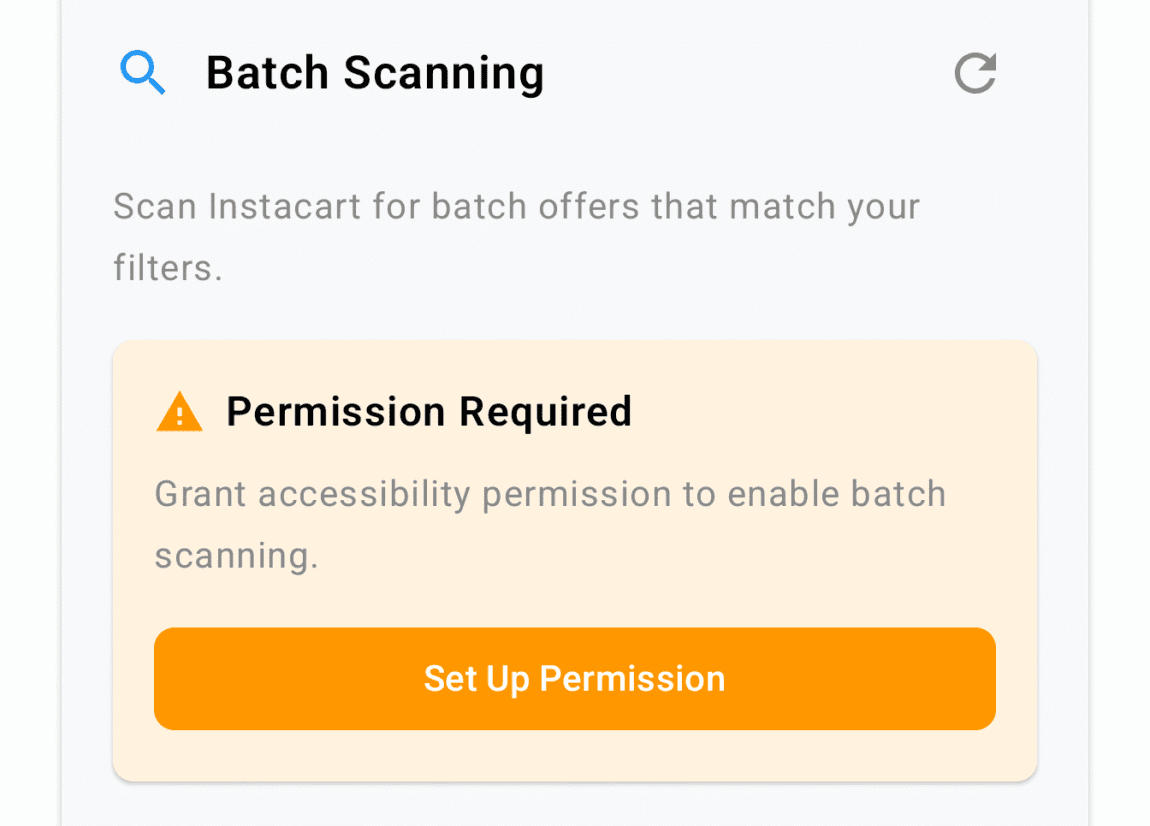
Accessibility Access — Required for core functionality. This allows Batch Grab to detect and interact with Instacart batches on your screen.
- Tap "Set Up Permission".
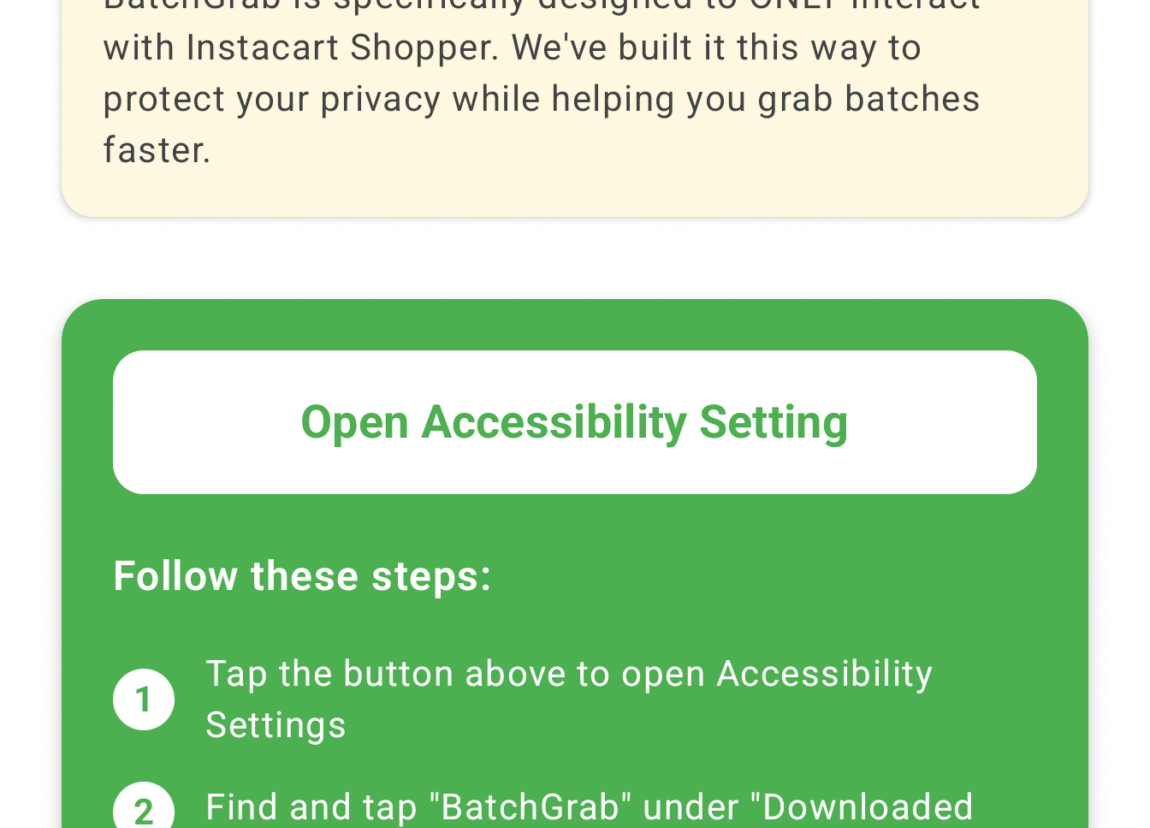
- Tap "Open Accessibility Setting".
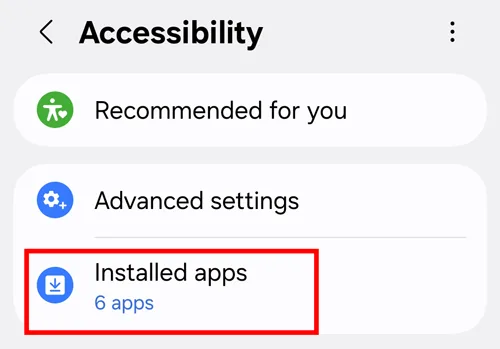
- Find and tap "Batch Grab" under "Downloaded Apps" or "Installed Apps" (for Samsung users).
- Toggle ON for Batch Grab, then tap "Allow".
- Come back to Batch Grab.
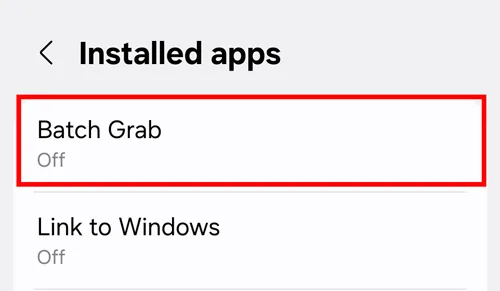
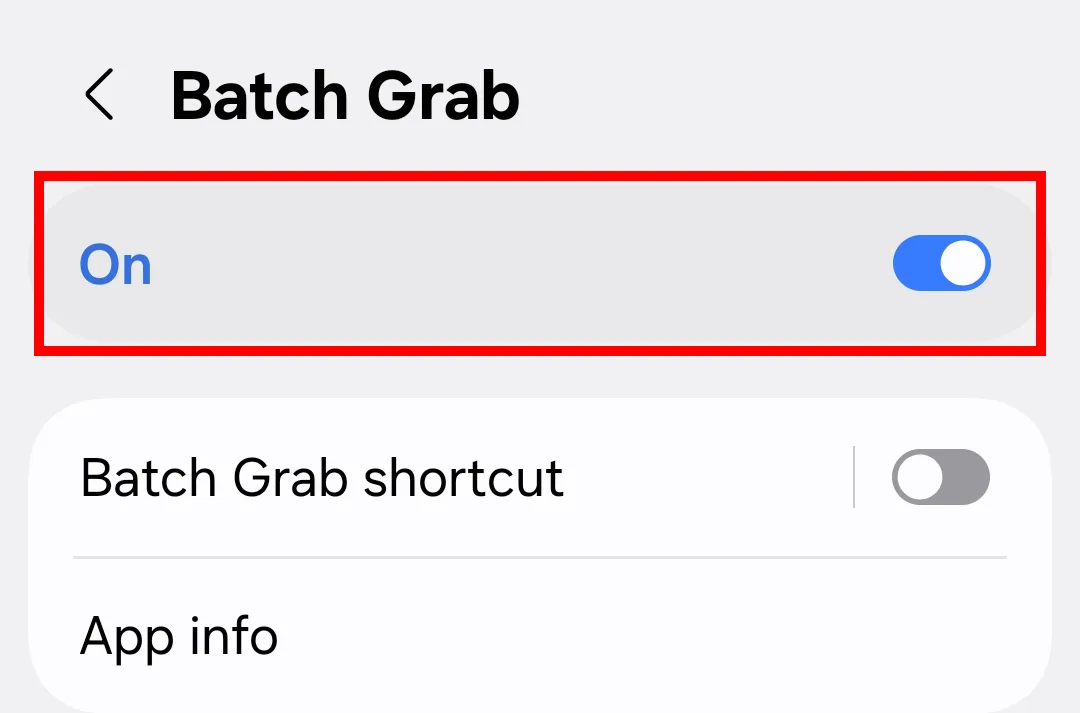
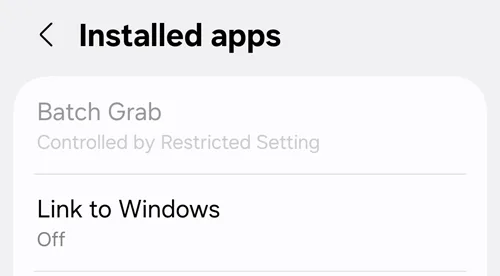
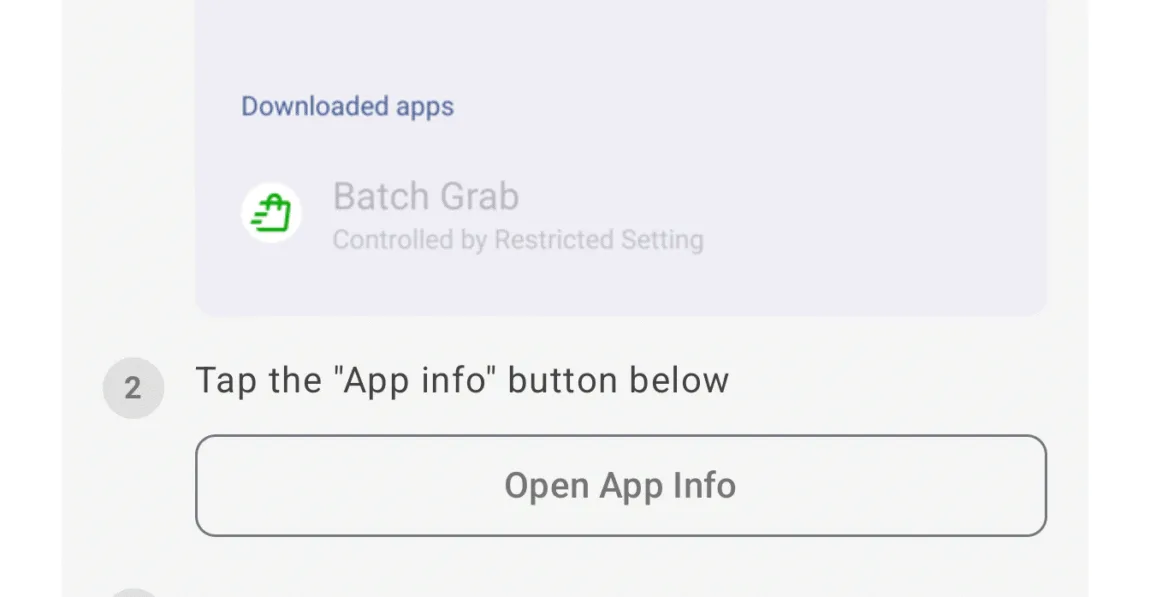
If Batch Grab appears greyed out in the accessibility list:
- Tap on the greyed-out "Batch Grab" once, then tap OK.
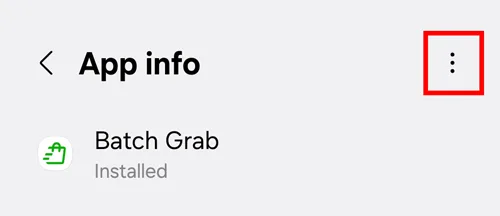
- Go back to the Batch Grab app and tap "Open App Info".
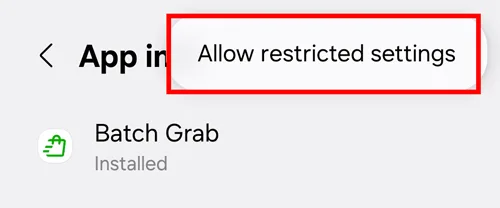
- Tap the 3-dot menu in the top right.
- Tap "Allow restricted settings".
- Go back to the steps above to allow Accessibility Permission.
Create Your First Filter
Start conservatively. You can always loosen filters later once you see how many Instacart batches match your criteria.
Recommended initial settings:
- Minimum Earnings: Set a threshold that supports your hourly income goals
- Max Distance: Limit to reduce unproductive driving time
- Max Items/Units: Avoid overly time-consuming shops
- Max Customers/Stores: Stick to simpler batches while learning
Pro Tip: Add favourite stores once you identify your most profitable locations.
Start Grabbing Instacart Batches
- Open the Batch Grab app and ensure your filters are enabled.
- Tap "Start Scanning".
- Open the Instacart app.
- Batch Grab will begin monitoring and accepting matching batches automatically.
Default settings:
- Auto-Accept is enabled by default on all plans
- Auto-Refresh is enabled by default on paid plans
Refine Filters Using Batch History
Periodically review your Batch History and adjust filter settings to better align with your preferences and earning goals. The best Instacart shoppers constantly optimize their filters based on real data.
Safety, Privacy, and Compliance
Batch Grab is designed as the safest Instacart bot for Android:
- Operates locally on your Android device (client-side only)
- Never requires your Instacart login credentials
- Avoids VPN or server-side automation that may increase detection risk
- Uses human-like behavior patterns to maintain a natural usage footprint
Disclaimer: While Batch Grab is designed with safety in mind, Instacart's terms of service do not officially endorse automation tools. Use at your own discretion.
Got Questions? We've Got Answers.
What is an Instacart bot?
An Instacart bot (also called an Instacart batch grabber) is an automation tool that helps Instacart shoppers accept batches faster. It monitors your batch feed and automatically accepts orders that match your filters — faster than any human can tap.
Is a "batch bot" the same thing as Batch Grab?
Yes — "batch bot" is just another common name for an Instacart batch grabber. Batch Grab is that tool: it watches your Instacart batch feed and auto-accepts orders that match your filters, running entirely on your Android device.
Is Batch Grab safe to use?
Yes. Batch Grab is designed as a safe Instacart bot for Android. It operates locally on your device without requiring your Instacart login credentials, VPN connections, or server-side access. This client-side approach minimizes detection risk.
Does Batch Grab work on iPhone?
No. Batch Grab is currently only available for Android devices. iOS security restrictions make safe automation extremely difficult, so the team focused on building the best Instacart bot for Android.
How much does Batch Grab cost?
Batch Grab offers a Free plan with basic features, plus Basic and Pro paid plans with flexible daily, weekly, or monthly payment options.
Can I get deactivated for using an Instacart batch grabber?
All automation tools carry some risk. However, Batch Grab is designed with safety as a priority — using client-side processing, human-like behavior, and no server-side access to minimize detection. Many shoppers have used Batch Grab without issues, but use is at your own discretion.
How do I get more Instacart batches?
The best way to get more Instacart batches is to: (1) position yourself near busy stores; (2) maintain a high shopper rating; (3) shop during peak hours; (4) use a batch grabber like Batch Grab to react faster than other shoppers.
What makes Batch Grab different from other Instacart bots?
Batch Grab is the safest Instacart batch grabber for Android because it runs entirely on your device (no servers), never asks for your Instacart login, offers GPS spoofing without VPNs, provides real human support, and has flexible pricing (daily/weekly/monthly).
What filters can I set?
Batch Grab gives you full control with 7 smart filter criteria: minimum pay, maximum number of items, maximum number of units, maximum delivery distance, maximum number of customers, maximum number of stores, and favorite stores (only grab from stores you choose). You can leave some criteria blank or set all of them — it's completely up to you. A batch must match all of the active criteria in your filter in order for the bot to auto-accept it.
How fast does it accept batches?
Faster than humanly possible. Once a batch hits your feed and matches your filters, Batch Grab can accept it within milliseconds — giving you a massive edge over manual users.
Is my Instacart login or data shared with anyone?
No, never. Batch Grab does not collect or transmit your login credentials or any Instacart data to external servers. Everything runs locally on your phone — your account and data stay private and secure.
Why should I trust Batch Grab over other Instacart bots?
Batch Grab was built by real Instacart drivers, not random developers. Unlike other Instacart bots that ask for your login, use VPNs, or rely on risky server-side access, Batch Grab is 100% client-side and runs safely on your Android device. It's the most affordable, secure, and supported Instacart bot available — designed for long-term use with real human support, constant updates, and transparent pricing.
Can I use Batch Grab and Instacart at the same time?
Yes — Batch Grab works side by side with the Instacart app. It runs as a floating overlay widget on your Android screen while Instacart is open. If a batch matches your filters, it's auto-accepted within milliseconds — you'll see it just as if you had tapped it yourself.
Ready to grab more batches?
Start free and see how much easier Instacart gets with Batch Grab.
Download for Android